
Takvim
v1.6.0 is out
A desktop calendar that asks for no account and never goes online. Your data stays on your machine, in a single SQLite file. One executable — no Python install needed.

As much as a calendar should.
Day, week, month
Three views, switched from the keyboard. Click an empty hour and an event opens.
Recurring events
Set up a series; deleting or moving a single instance does not break the rest.
Tasks
A to-do list. Give a task a time and it becomes a block on the calendar; skip the time and it stays on that day’s list.
Multiple calendars
Class, Personal, Work — each with its own colour and visibility toggle.
Reminders
Desktop notifications. The app runs in its own window, not in a browser tab.
.ics import and export
Bring your events over from another calendar, or take your data out any time.
Backups
Automatic backup on every launch; if the data file gets damaged, Takvim offers to go back to the latest healthy backup. The data lives on your machine.
Turkish / English interface
Settings → Language. The whole interface switches, including day/month names and notifications.
Technical summary.
- Version
- v1.6.0
- Platform
- Windows (single .exe)
- Licence
- MIT — open source
- Stack
- Python · WebView2 · SQLite
- Data
- Local SQLite file, offline
- Price
- Free
What we deliberately left out.
A project without an out-of-scope list is a project with infinite scope. Keeping this list short is a decision — quietly growing it is not.
- Server and accounts
- Multi-device sync
- Attendees / invites / RSVP
- Mobile app
- CalDAV
From the devlog
All entries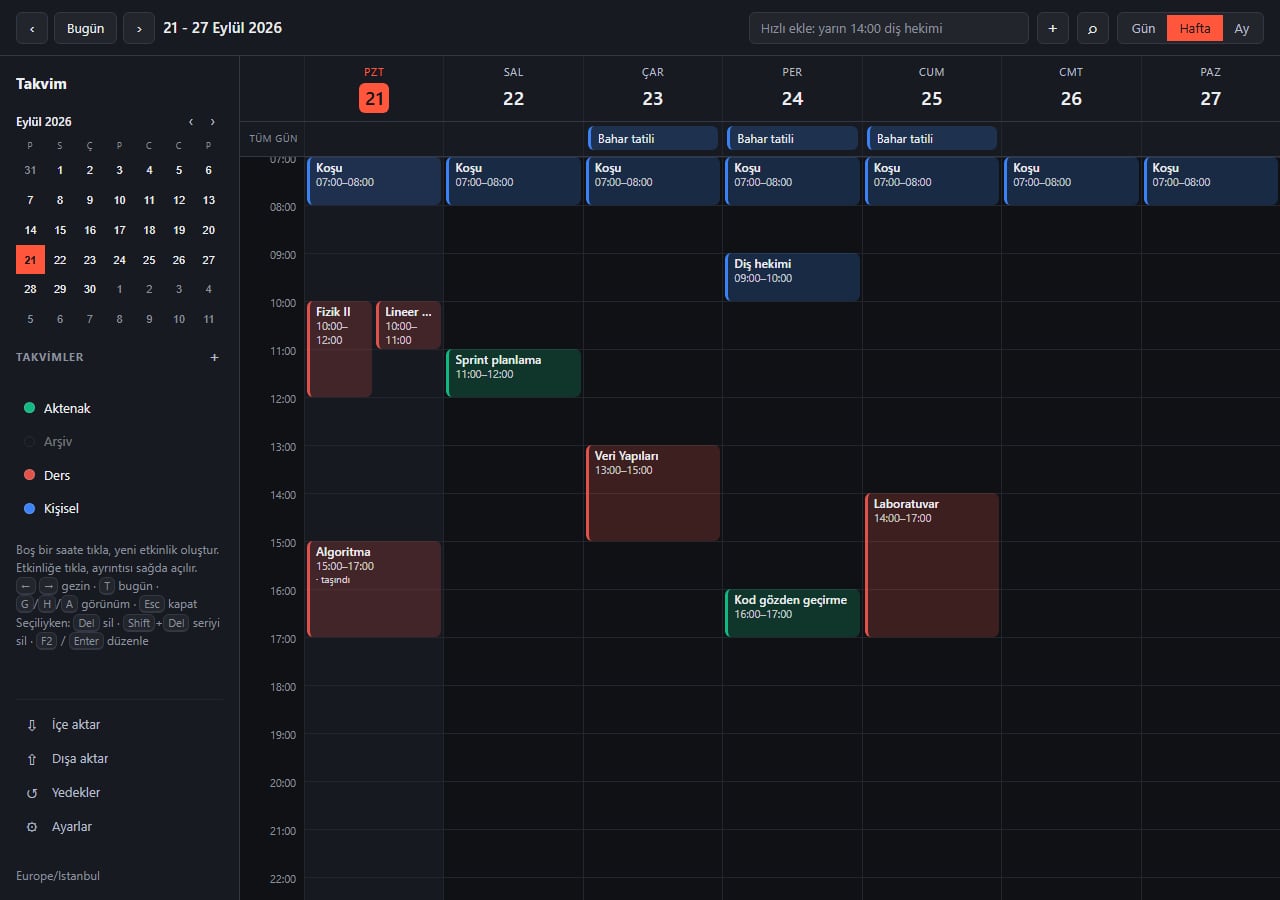
Takvim 1.4 to 1.6: tasks, language choice and data recovery
Three releases since launch: a Turkish/English interface, a to-do list, recovery from a corrupted database and protection against DNS rebinding.
Takvim is out: an offline desktop calendar with no account
Aktenak's first shipped tool arrives with its own product page: a single file for Windows, MIT-licensed open source.
Installing
The app is not distributed with a signed certificate, so Windows may show a SmartScreen warning on first launch. The code is fully open — you can read exactly what it does before downloading. Since v1.4.1 every release is built on GitHub: you can confirm the file you downloaded was built from this code with its SHA256 checksum and GitHub attestation. The steps to get past the warning and to verify the file are in the readme.
Install, verify and source code →