
Dosya Dolabı
v1.1.2 is out
An Android app that sorts your PDFs, slides and documents into categories that are real folders on the device. Files are actually moved there and stay put even if you uninstall the app. Every file shows a preview on its card, so even oddly named ones are easy to recognise. Designed for tablets, works on phones too.

Puts your files where they belong.
Inbox
New PDFs, slides and documents you download or receive (Downloads, WhatsApp, Telegram, SD card) collect in one list and wait there until you file them.
Previews
Each card shows a piece of the file itself: the first page of a PDF, images, the first slide or page of presentations and documents. You recognise a poorly named file without opening it.
Large preview
Choose Preview in the card menu: the top of the page or slide opens at a readable size and zooms with your fingers. From there you can file the document or open it.
Real folders
Each category is a real folder on your device (Dosya Dolabı/Dersler/Matematik). Files are actually moved, and stay put even if you uninstall the app.
Nested categories
As deep as you like: Courses, Maths, Midterm. Delete a category and its contents move up one level — no file is ever lost.
Bulk move
Long-press to select several files and file them in one go. Create the category on the spot if it doesn't exist yet.
Undo and trash
An Undo after every move and delete. Deleted files wait 30 days in the trash and can be put back.
Turkish-aware search
Typing "notlari" finds "notları". Searches the inbox and every category at once.
Tablet and phone
A permanent sidebar on wide screens; a drawer, one-tap search and icon buttons on narrow ones.
Offline and private
The app has no internet permission. Your files never leave the device.
Technical summary.
- Version
- v1.1.2
- Platform
- Android 7.0 and up (APK)
- Licence
- MIT — open source
- Stack
- Flutter · Dart
- Data
- Real folders on the device, offline
- Price
- Free
What we deliberately left out.
A project without an out-of-scope list is a project with infinite scope. Keeping this list short is a decision — quietly growing it is not.
- Cloud and accounts
- Full document viewing or editing (previews only; your device's own apps open the file)
- Multiple tags (each file lives in one category)
- Play Store and iOS versions
- Multi-device sync
From the devlog
All entries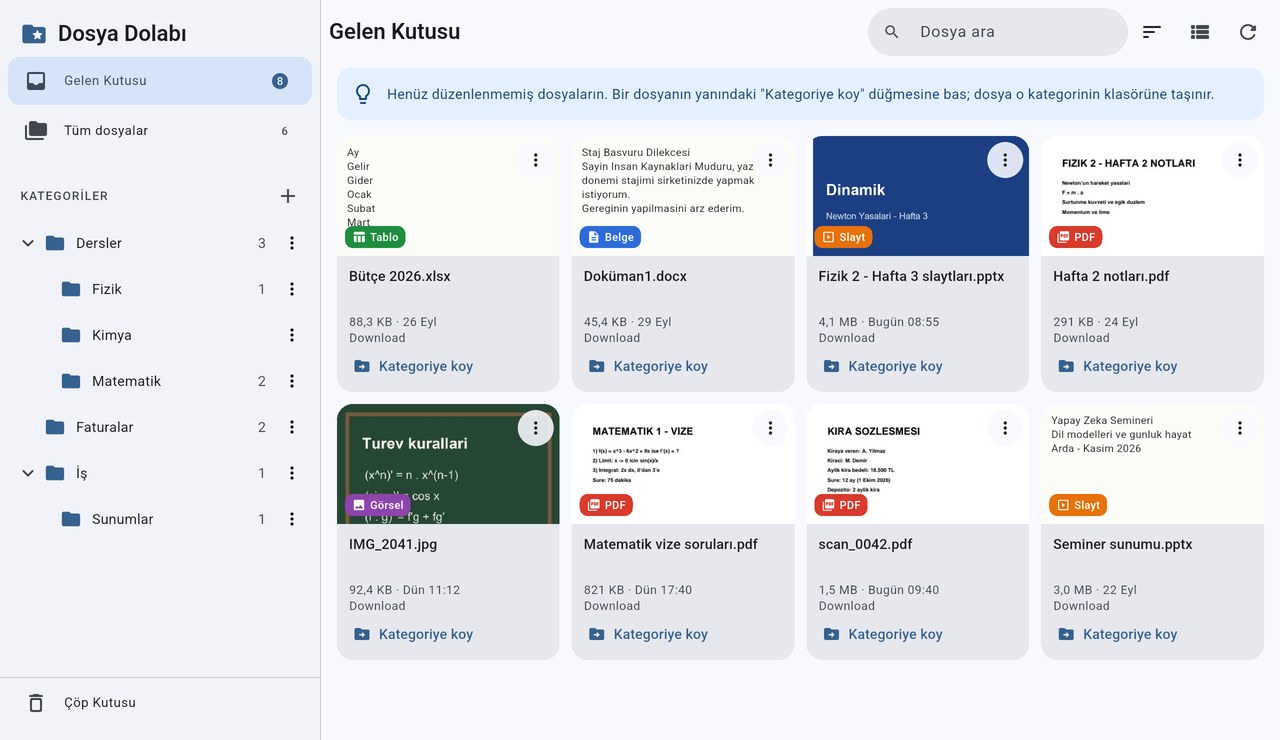
Dosya Dolabı 1.1.2: previews no longer hang
1.1.2 closes three ways a broken or malicious document in the Inbox could lock up the preview for minutes. It installs straight over 1.1.1.
Dosya Dolabı 1.1.1: the trash was deleting files too early
1.1.1 fixes two data-loss bugs and a broken document crashing the app on every launch. Moving to it needs a one-time reinstall; your files are not deleted.
Dosya Dolabı is out: an Android app that sorts files into real folders
Aktenak's third tool arrives with its own product page: an Android app that files PDFs, slides and documents into real folders on the device.
Dosya Dolabı 1.1.0: file previews
The new release shows each file's content on its card, so you can recognise a PDF or a slide deck with a meaningless name without opening it.
Installing
The app is distributed as an APK, not through the Play Store: the "All files access" permission it needs to move files is restricted there. Android may ask for the "install unknown apps" permission and show a Play Protect warning on first install. The code is fully open — you can read what it does before downloading, and each release lists its SHA-256 checksum. On first launch you need to switch on "Allow access to all files". From v1.1.1 (trash and zip-bomb fixes) APKs are signed in GitHub Actions with a permanent key; coming from 1.1.0 you need to uninstall and reinstall once, your files are not deleted. Feedback from other devices is welcome.
Install steps and source code →