
Habit Tracker
v1.3.1 is out
A habit tracker that needs no account and never talks to a server. Habits, mood, tasks and focus sessions — in one panel. Your data stays on your machine.

Four modules, one panel.
Daily panel
Today's habits, one tap through done → missed → skipped → blank. Countable habits take a quantity entry.
30-day heat strip
Each habit's own colour, light to dark, over the last 30 days, plus a 7-day completion rate.
Focus timer
Pomodoro (25/45/15 min). Today's and the last 7 days' total focus time on the panel.
Tasks and mood
A weekly task list grouped by urgency, a daily mood pick, and a 30-day mood line.
Monthly grid view
The classic paper-tracker feel — rows are habits, columns are days. Tap a cell, the status cycles.
Stats
Streak, longest streak, completion rate, and mood-to-completion correlation (Pearson r).
JSON backup
All data in one file; restore by merging or fully replacing.
System tray
Closing the window minimises to the tray instead of quitting. The tooltip shows today's status; right-click to mark a habit done in one click.
Keyboard shortcuts
Ctrl+1..4 switch tabs, Ctrl+N adds a new habit.
Evening reminder
A notification at a time you choose (8pm by default) if any habit is still pending.
Start with Windows
Opt-in; if enabled, the app starts in the tray at login.
Automatic backup
A full backup into the data folder once a day; the last 14 are kept. Settings shows where your data lives and opens it in one click.
Window position + system theme
The window's size and position are remembered. Theme is dark, light, or system — following Windows.
Technical summary.
- Version
- v1.3.1
- Platform
- Windows (portable ZIP)
- Licence
- MIT — open source
- Stack
- Flutter · Dart · SQLite (drift)
- Data
- Local database, offline
- Price
- Free
What we deliberately left out.
A project without an out-of-scope list is a project with infinite scope. Keeping this list short is a decision — quietly growing it is not.
- Server and accounts
- Multi-device sync
- Mobile app
From the devlog
All entries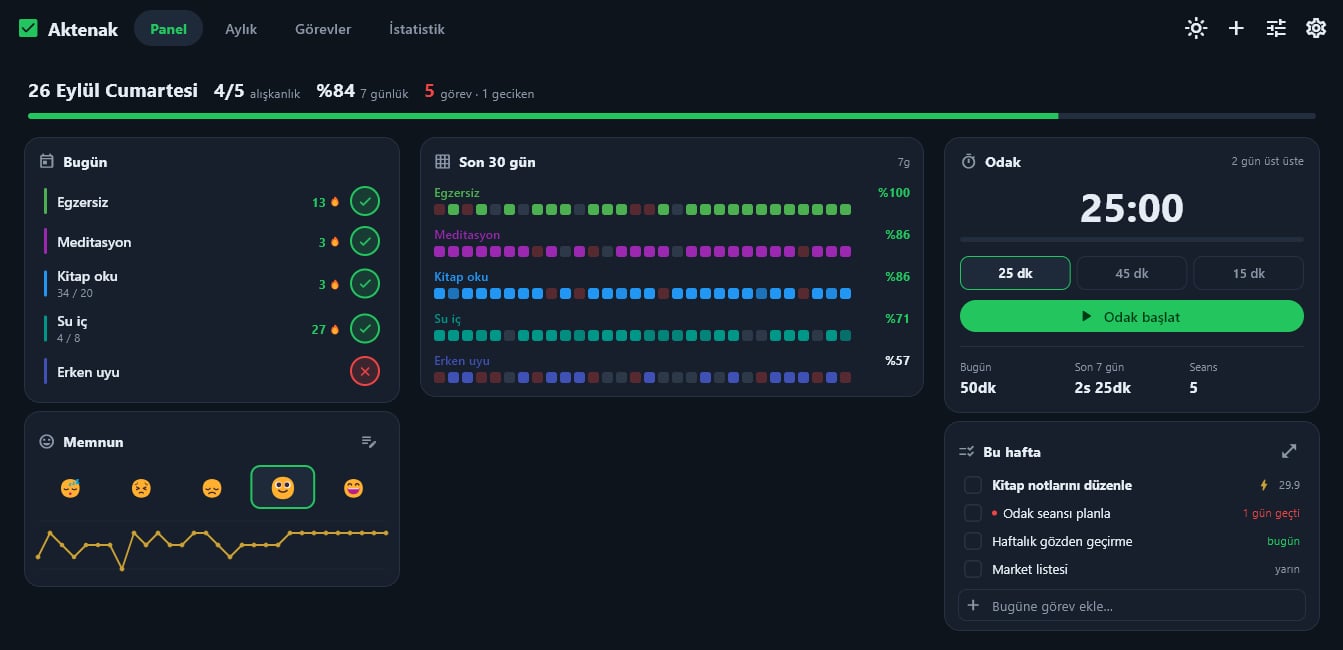
Habit Tracker 1.3.0: v1.2.x opened your data in the wrong folder
On Windows, v1.2.0 and v1.2.1 opened data in an empty folder. v1.3.0 fixes it and moves the old data back, along with automatic backups, window position memory and a system theme.
Habit Tracker is out: a habit tracker with no account
Aktenak's second tool arrives with its own product page: habits, mood, tasks and focus sessions on one dashboard.
Installing
The app is not distributed with a signed certificate, so Windows may show a SmartScreen warning on first launch. Unzip it into a folder — no install or admin rights needed. The code is fully open — you can read exactly what it does before downloading.
Install steps and source code →